🏎️ ACC FOV Calculator
Calculate your perfect Field of View for Assetto Corsa Competizione
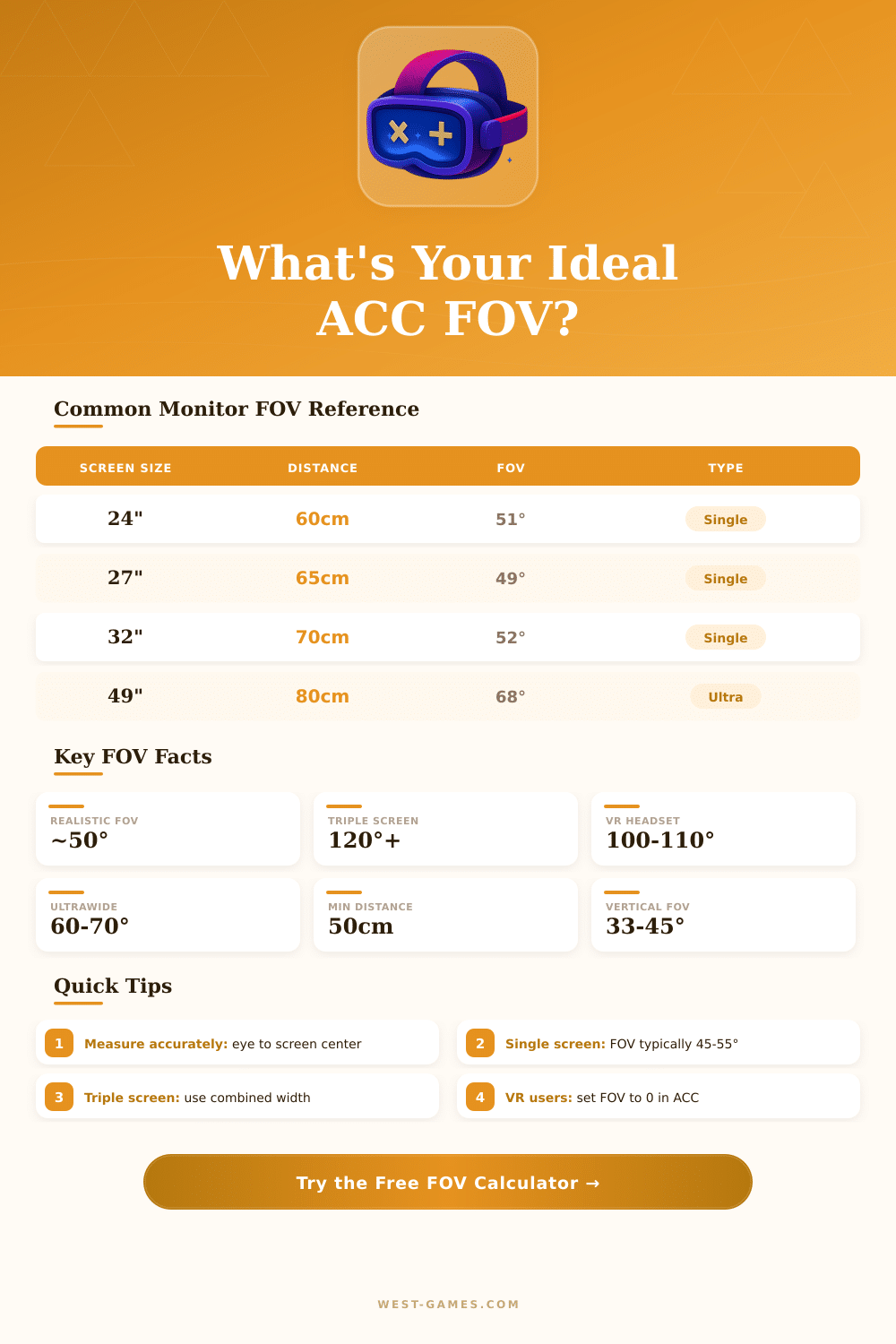
| Screen Size | Aspect Ratio | Distance (cm) | Recommended FOV | Setup Type |
|---|---|---|---|---|
| 24" | 16:9 | 55 cm | 53° | Single |
| 24" | 16:9 | 65 cm | 46° | Single |
| 27" | 16:9 | 60 cm | 51° | Single |
| 27" | 16:9 | 75 cm | 42° | Single |
| 32" | 16:9 | 70 cm | 52° | Single |
| 34" | 21:9 | 70 cm | 60° | Ultrawide |
| 49" | 32:9 | 80 cm | 68° | Super Ultrawide |
| 3x 24" | 48:9 | 65 cm | 130° | Triple |
| 3x 27" | 48:9 | 65 cm | 140° | Triple |
| VR | — | — | 0 (Auto) | VR Headset |
| Screen Size | 16:9 Width (cm) | 21:9 Width (cm) | 16:9 Width (in) | 21:9 Width (in) |
|---|---|---|---|---|
| 24" | 53.1 cm | 62.5 cm | 20.9" | 24.6" |
| 27" | 59.8 cm | 70.4 cm | 23.5" | 27.7" |
| 32" | 70.8 cm | 83.4 cm | 27.9" | 32.8" |
| 34" | 75.2 cm | 88.6 cm | 29.6" | 34.9" |
| 49" | — | 128.3 cm | — | 50.5" |
| Formula Component | Description | Value Used |
|---|---|---|
| Screen Width | Horizontal width from diagonal + ratio | Calculated from inputs |
| Eye Distance | Distance from eyes to screen surface | User measured |
| Base Formula | 2 * arctan(width / (2 * distance)) | Horizontal FOV |
| Vertical FOV | Derived from horizontal + aspect ratio | Shown in results |
| Triple Adjust | Adds side monitor angles + bezel | Applied for triple |
These bits from actual chatters and posts from the community of fake runs.
FOV, or simply FOV maybe seems simply another setting for play in Assetto Corsa Competizione, even so it ranks between the most important parts that you will have to change. It decides, how much of the virtual world shows on your screen, and it seriously affects your sense of space and the feeling of speed, when you drive. If you set it right for your need, you will right away see the change.
Simple guide to FOV in Assetto Corsa Competizione
Here is where many folks start to get confused: the measures of FOV in ACC base on vertical degrees, while most other programs, like iRacing, favour horizontal. That main difference shows, why the numbers look so different between various games. Who enters from iRacing to ACC will naturally hope for a much bigger value, but ACC simply uses another scale.
Our eyes own around 200 degrees for whole FOV, although only between 40 and 60 degrees deliver the main visual data, that we truly need. The rest comes from side sight, that mainly notcies motions and changes.
Human sight naturally stretches more broadly in horizontal than in vertical. Because of that televisions and computer monitors have the form, that they have. Even so, both Assetto Corsa and ACC stick to the vertical axis for that measurement.
Calculators for FOV exist for iRacing, ACC and even for the first Assetto Corsa. They consider the shape of your screen, the real size of your monitor, the distance, how far you sit away from it, and whether you use one single screen or triple setups. Finding the write value for it is easy, in ACC go to Settings, Chart, later FOV.
In AC it sits under Settings, Sight, Field of Sight.
Good setup of FOV certainly helps you spot braking points more faithfully while turning through corners. On the other hand, what the math suggests as precise value commonly feels too close, when you truly drive. Calculator maybe gives something around 16 degrees, what is so narrow, that you almost do not see the own car.
Most folks think, that at least 40 to 45 degrees form the basic minimum, so that you have some idea about the surroundings.
The default FOV for the viewpoint of the dashboard in ACC stands at 54 degrees, and that viewpoint is truly liked, you easily reach good times for circuits with it. Try with viewpoint 2 (the camera from the car) and keep the default FOV before changing other things is a truly clear step. Or otherwise, use a calculator to reach a guess within 10 degrees, later finally set your virtual seat position from that base.
For the home setup, a 32-inch monitor has a height of around 40 centimetres, and because the calculation of FOV in ACC depends on vertical measure, the height of the monitor matters. Sitting very far from a small screen with exact FOV could feel strange. One driver with a 22-inch monitor found, that 48 degrees works great.
Another setup, 27-inch monitor at one metre of distance… Drives at 39 degrees and works well. The main lesson here is testself and not simply trust blindly the results of calculators.
Commonly the choices for FOV were sadly limited. The versions for PlayStation pushed it truly hard to show the change of FOV. The PS5 version, shown at exhibition, indeed carries both choices for FOV and for the seat position.
Full setup of FOV is available in the first Assetto Corsa, and that same freedom should arrive also in ACC.